Why Master Advanced Techniques?
While Markdown's basic syntax is simple and easy to learn, mastering advanced techniques is essential to truly unlock its potential. With the continuous evolution of the Markdown ecosystem, various extended syntaxes, platform-specific features, and integrated tools provide users with powerful document creation capabilities[1].
In modern digital work environments, documents are no longer just static text but composite information carriers that require interactive elements, data visualization, multimedia content, and dynamic updates. Mastering advanced Markdown techniques enables users to create more professional and feature-rich documents that meet complex business and technical requirements.
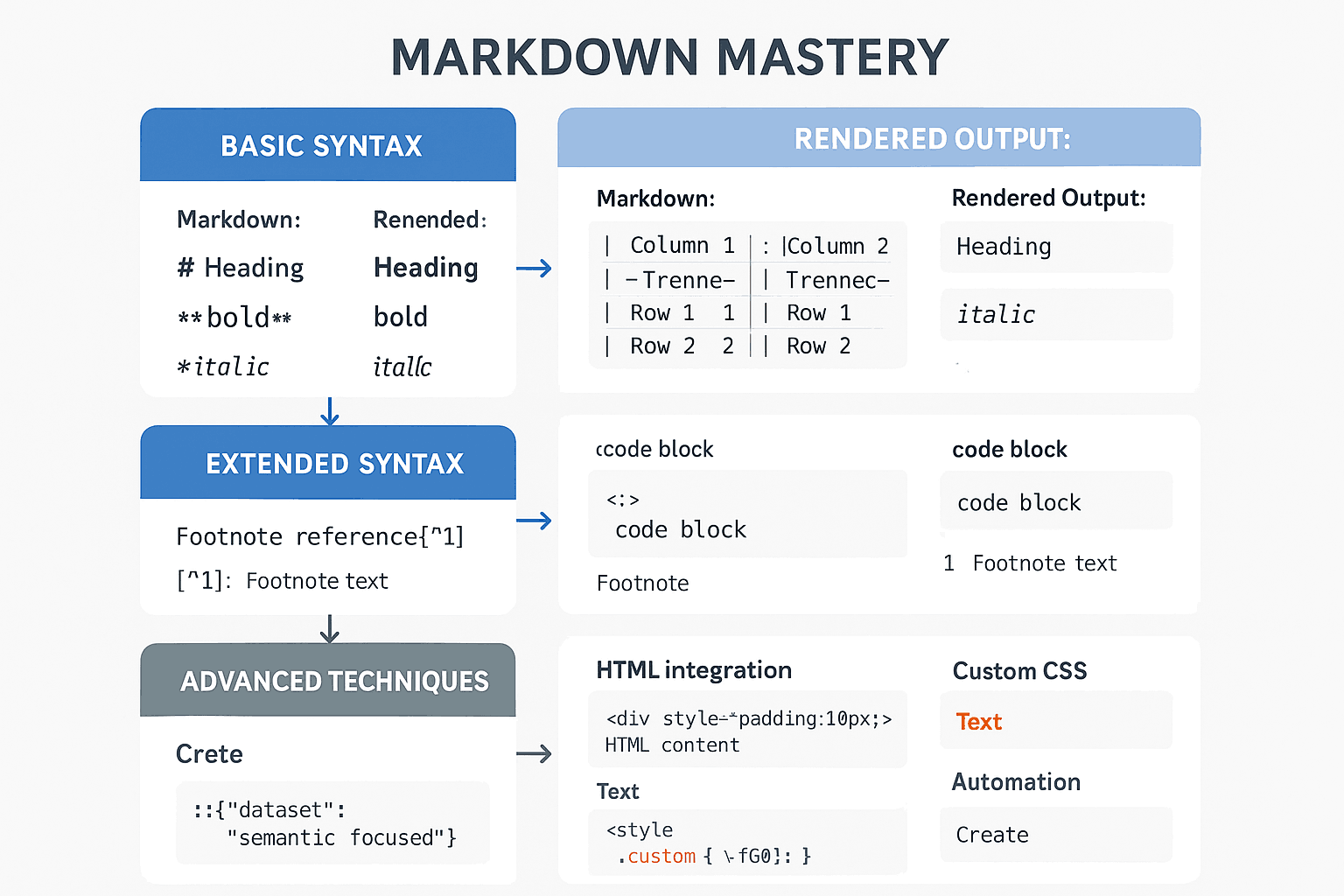
The value of advanced techniques is reflected in multiple dimensions. First is functional extensibility. By mastering extended syntax and HTML integration techniques, users can achieve complex table layouts, custom styling, interactive elements, and other functionalities, breaking through the limitations of basic Markdown. Second is efficiency improvement. Automation tools and template systems can significantly reduce repetitive tasks, enhancing the efficiency of document creation and maintenance.
Professionalism is another critical value. Advanced techniques allow Markdown documents to achieve the professional standards of traditional word-processing software, including precise formatting control, complex mathematical formulas, and professional diagrams. This is particularly important for scenarios such as technical documentation, academic papers, and business reports.
Cross-platform compatibility is also a significant advantage of advanced techniques. By understanding the specific features and limitations of different platforms, users can create documents that display well across multiple platforms, ensuring consistency and effectiveness in information delivery.
Finally, there's maintainability and scalability. Advanced techniques include methods such as version control integration, automated testing, and modular organization, ensuring that document projects can be maintained and expanded over the long term.
For users who have already mastered the basics of Markdown and need a refresher, refer to our Complete Markdown Guide. For more detailed syntax information, the Markdown Syntax Deep Dive provides a comprehensive syntax reference.
Mastering Extended Syntax
Extended syntax is key to Markdown's evolution from a basic tool to a powerful documentation platform. These syntax extensions are not part of the original Markdown specification but have been widely adopted and become standard components of the modern Markdown ecosystem[2].
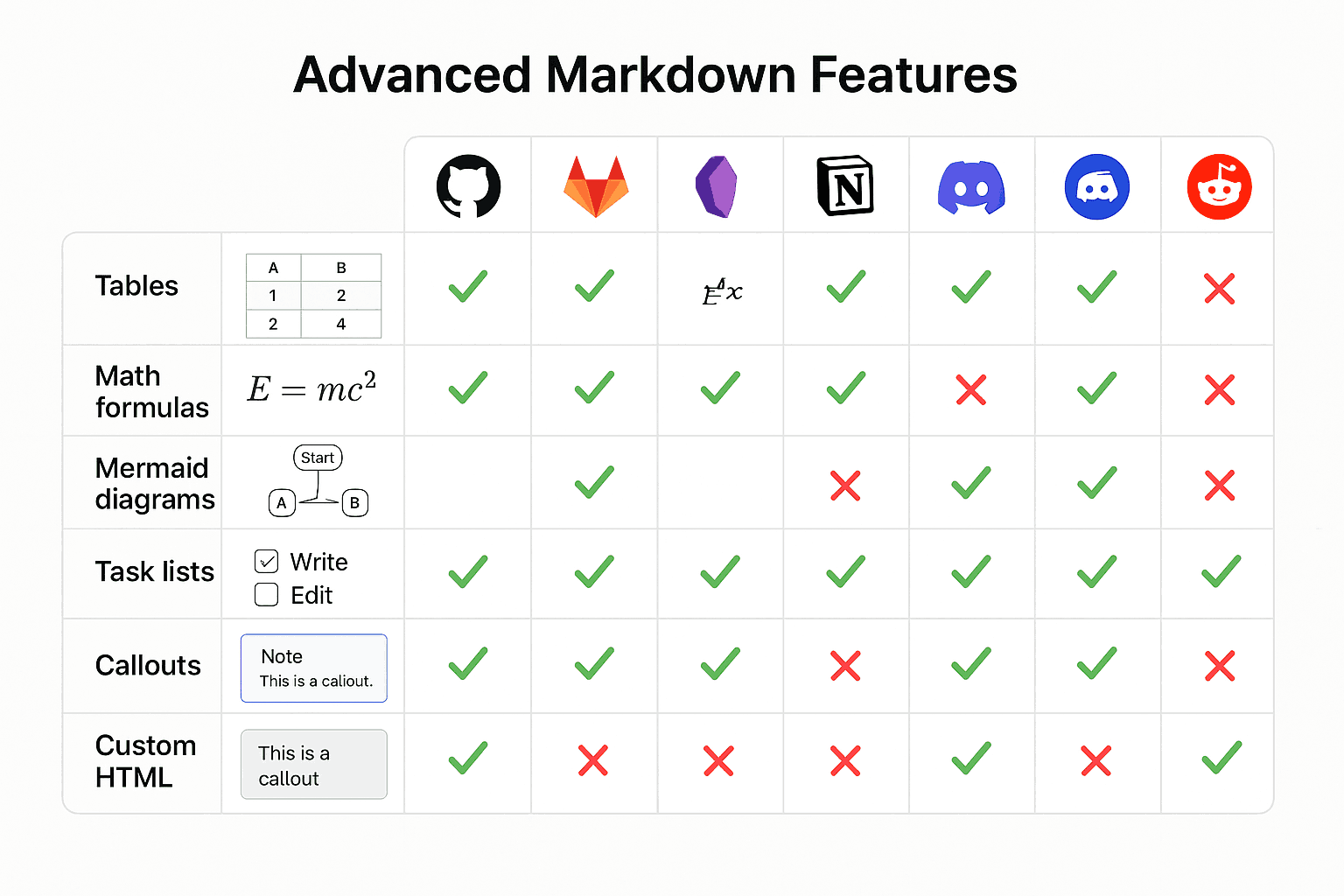
Advanced Table Techniques
Tables are one of the most practical features in Markdown's extended syntax, but realizing their full potential requires mastering a range of advanced techniques. While basic table syntax is straightforward, it often falls short when handling complex data presentation.
Complex Table Layouts
Standard Markdown table syntax supports basic row and column structures, but by combining HTML tags, more complex layout requirements can be achieved. Merging cells is one of the most common needs. While pure Markdown does not support this, it can be implemented using HTML's colspan and rowspan attributes.
<table>
  <tr>
    <th colspan="2">Merged Header</th>
    <th>Regular Header</th>
  </tr>
  <tr>
    <td>Data 1</td>
    <td>Data 2</td>
    <td>Data 3</td>
  </tr>
  <tr>
    <td rowspan="2">Vertical Merge</td>
    <td>Data 4</td>
    <td>Data 5</td>
  </tr>
  <tr>
    <td>Data 6</td>
    <td>Data 7</td>
  </tr>
</table>
Nested tables, though less common, can be highly useful in certain complex data presentation scenarios. A complete table structure can be embedded within a table cell to achieve hierarchical data organization.
Customizing table styles is an important way to enhance visual appeal. Inline CSS or external stylesheets can be used to control visual properties such as colors, borders, and spacing.
<table style="border-collapse: collapse; width: 100%;">
  <tr style="background-color: #f2f2f2;">
    <th style="border: 1px solid #ddd; padding: 8px;">Header 1</th>
    <th style="border: 1px solid #ddd; padding: 8px;">Header 2</th>
  </tr>
  <tr>
    <td style="border: 1px solid #ddd; padding: 8px;">Data 1</td>
    <td style="border: 1px solid #ddd; padding: 8px;">Data 2</td>
  </tr>
</table>
Responsive Table Design
In today's mobile-first world, responsive table design has become increasingly important. Traditional tables are often difficult to read on small screens and require special handling.
Horizontal scrolling is the simplest solution. By wrapping the table in a scrollable container, users can horizontally scroll to view the full table content on small screens.
<div style="overflow-x: auto;">
  <table>
    <!-- Table content -->
  </table>
</div>
Stacked layouts are another common responsive solution. On small screens, table rows are transformed into vertically stacked cards, with each card containing all the data for a single row.
Hiding non-critical columns can maintain readability while adapting to small screens. Using CSS media queries, different columns can be displayed at varying screen sizes.
Best Practices for Data Tables
Designing data tables requires consideration of user reading habits and information retrieval needs. Header design is a key factor—clear headers help users quickly understand the table content.
Data alignment rules should be determined by data type. Numbers are typically right-aligned, text is left-aligned, and dates can be aligned based on format. Consistent alignment aids users in quickly scanning and comparing data.
Color coding can enhance table readability. By using different background or text colors, important data can be highlighted, categories can be distinguished, or data states can be displayed.
Sorting and filtering features, though requiring JavaScript support, can significantly improve the user experience for large tables. These functionalities can be implemented by integrating existing table libraries.
Advanced Code Block Applications
Code blocks are indispensable elements in technical documentation. Mastering advanced code block techniques can significantly enhance the quality and readability of technical documents.
Syntax Highlighting Optimization
Syntax highlighting is the most fundamental and crucial feature of code blocks. Different programming languages have distinct syntax characteristics, and selecting the correct language identifier is essential for code readability.
// JavaScript Example
function fibonacci(n) {
  if (n <= 1) return n;
  return fibonacci(n - 1) + fibonacci(n - 2);
}
# Python Example
def fibonacci(n):
    if n <= 1:
        return n
    return fibonacci(n - 1) + fibonacci(n - 2)
-- SQL Example
SELECT
  user_id,
  COUNT(*) as order_count,
  SUM(total_amount) as total_spent
FROM orders
WHERE order_date >= '2024-01-01'
GROUP BY user_id
ORDER BY total_spent DESC;
Custom syntax highlighting themes can better integrate code blocks into the overall document design. Most Markdown parsers support various predefined themes, and custom themes can also be created using CSS.
Line numbering is particularly useful for lengthy code blocks, helping readers locate specific lines of code and facilitating references to particular lines in discussions.
function complexFunction() {
  // Line 1: Function definition
  const data = fetchData();
  // Line 3: Data retrieval
  const processed = processData(data);
  // Line 5: Data processing
  return processed;
}
Code Block Annotations and Explanations
Code comments are an important component of code blocks, but additional explanations in the document are needed to help readers understand the context and purpose of the code.
Inline comments should be concise and clear, explaining the key logic of the code rather than obvious operations. Good comments help readers grasp the intent of the code, not just its implementation.
Code block titles can be implemented in various ways. The simplest method is to add descriptive text before the code block, while a more advanced approach involves using syntax that supports titles.
async function authenticateUser(username, password) {
  try {
    const user = await User.findOne({ username });
    if (!user) {
      throw new Error("User not found");
    }

    const isValid = await bcrypt.compare(password, user.passwordHash);
    if (!isValid) {
      throw new Error("Incorrect password");
    }

    return generateToken(user);
  } catch (error) {
    console.error("Authentication failed:", error.message);
    throw error;
  }
}
Displaying code execution results can help readers understand the actual effects of the code. Output examples can be added after code blocks, or special syntax can be used to identify the output content.
$ npm install markdown-it
npm WARN deprecated [email protected]: this library is no longer supported
+ [email protected]
added 16 packages from 10 contributors and audited 16 packages in 2.341s
Interactive Code Examples
Interactive code examples allow readers to run and modify code directly within the documentation, which is particularly valuable for teaching and demonstrations. While standard Markdown does not support interactive code, third-party services can be integrated to achieve this.
CodePen embeds are a common technique in web development documentation. HTML, CSS, and JavaScript code can be embedded in CodePen, and then the CodePen iframe can be embedded in the documentation.
<iframe
  height="300"
  style="width: 100%;"
  scrolling="no"
  title="Markdown Demo"
  src="https://codepen.io/example/embed/xyz123?height=300&theme-id=dark&default-tab=html,result"
  frameborder="no"
  loading="lazy"
  allowtransparency="true"
  allowfullscreen="true"
>
</iframe>
Platforms like JSFiddle and CodeSandbox also offer similar embedding features, allowing you to choose the most suitable platform based on specific needs.
Local interactive environments can be implemented using tools like Jupyter Notebook or Observable. These tools are particularly well-suited for documentation in data science and research fields.
Footnotes and Citation Systems
Footnotes and citation systems are essential components of academic and professional documentation. Proper use of these features enhances the professionalism and credibility of the document.
Advanced Applications of Footnotes
The basic syntax for footnotes is relatively simple, but there are many techniques to improve their effectiveness in practical applications. Footnote numbering can use numbers, letters, or custom identifiers—selecting an appropriate numbering method helps with document organization and readability.
This is a sentence with a footnote[^1]. Here is another footnote[^note2].

[^1]: This is the content of the first footnote.
[^note2]: This is the second footnote, using a custom identifier.
Long footnotes can include multiple paragraphs, lists, code blocks, and other complex content. Proper indentation allows for rich formatting within footnotes.
This references a complex concept[^complex].

[^complex]: This is a detailed footnote containing multiple paragraphs.

    The second paragraph requires proper indentation to remain within the footnote.

    ```python
    # Code can also be included in footnotes
    def example():
        return "Hello, World!"
    ```

    - List item 1
    - List item 2
Managing footnote placement is particularly important in lengthy documents. Although footnote definitions can be placed anywhere in the document, it is advisable to adopt a consistent organizational approach, such as placing all footnote definitions at the end of the document or the end of relevant sections.
Citations and References
Academic documents and professional reports often require strict citation formats. While Markdown itself does not provide built-in citation formatting, standard citation styles can be implemented in various ways.
The APA format is commonly used in psychology and social sciences. In Markdown, APA citations can be manually formatted or generated automatically using specialized tools.
According to research by Smith and Johnson (2023), the application of Markdown in academic writing is growing rapidly[^smith2023].

[^smith2023]: Smith, J., & Johnson, M. (2023). _The rise of Markdown in academic writing_. Journal of Digital Documentation, 15(3), 45-62. https://doi.org/10.1000/jdd.2023.15.3.45
The MLA format is widely used in literature and humanities, characterized by in-text citations with author-page references.
The IEEE format is common in engineering and technical fields, employing numbered citations.
Markdown's extended syntax provides powerful features for technical documentation [1].

## References

[1] IEEE Computer Society, "Markdown Extensions for Technical Documentation," _IEEE Transactions on Professional Communication_, vol. 66, no. 2, pp. 123-135, June 2023.
Cross-Referencing System
Cross-referencing allows linking to other sections, figures, tables, or elements within a document. This is particularly useful for organizing and navigating long documents.
Section references can be implemented using anchor links. Assign anchors to key sections and reference them where needed.
As discussed in [Section 3.2](#advanced-table-techniques), responsive table design requires special considerations.

For detailed implementation methods, refer to the [Practical Application Cases](#practical-application-cases) section.
Figure and table references require unique identifiers for each element, which are then cited in the text.
As shown in Figure 1, Markdown's syntax hierarchy follows a progressive structure.

Automatic numbering systems can be implemented using scripts or tools to ensure consistency and accuracy in reference numbering. This is especially valuable for frequently revised documents.
Definition Lists and Task Lists
Definition lists and task lists are highly practical features in Markdown's extended syntax, offering greater flexibility in organizing information.
Use Cases for Definition Lists
Definition lists are ideal for term explanations, concept descriptions, API documentation, and similar scenarios. Compared to regular lists, they provide a clearer term-definition structure.
API
: Application Programming Interface

REST
: Representational State Transfer

JSON
: JavaScript Object Notation
Multi-level definition lists can handle complex conceptual hierarchies. Proper indentation enables nested definition structures.
Programming Language
: A formal language used to write computer programs

    High-Level Language
    : A programming language close to human natural language

        Python
        : An interpreted, object-oriented high-level programming language

        JavaScript
        : A dynamic, weakly typed scripting language

    Low-Level Language
    : A programming language close to machine code

        Assembly Language
        : A language using mnemonics to represent machine instructions
Customizing the styling of definition lists can be achieved through CSS, including adjustments to visual properties such as indentation, fonts, and colors.
Advanced Features of Task Lists
Task lists are powerful tools for project management and to-do tracking. The basic syntax for task lists is simple and intuitive, but more complex functionalities can be implemented with certain techniques.
- [x] Complete project requirements analysis
- [x] Design system architecture
- [ ] Implement core features
  - [x] User authentication module
  - [ ] Data processing module
  - [ ] Report generation module
- [ ] Write test cases
- [ ] Deploy to production environment
Task priorities can be indicated using special markers or color coding. While standard Markdown does not support priorities, they can be implemented through agreed-upon symbols or HTML tags.
- [x] 🔴 Fix security vulnerability (High priority)
- [ ] 🟡 Optimize database queries (Medium priority)
- [ ] 🟢 Update user interface (Low priority)
Task assignments can be managed by including assignee information in the task description, which is particularly useful for team collaboration.
- [ ] Implement user registration (@John)
- [ ] Design database schema (@Jane)
- [ ] Write API documentation (@Bob)
Progress tracking can be achieved through the completion status of task lists. Some platforms also support partially completed task states.
Integration with project management tools enables more powerful functionalities. Many project management platforms support importing tasks from Markdown task lists or synchronizing task statuses with Markdown documents.
For document standardization in team collaboration, we recommend referring to our Markdown Best Practices guide, which includes detailed team collaboration norms and workflow design.
HTML Hybrid Techniques
Markdown's design philosophy emphasizes simplicity and ease of use, but this simplicity can sometimes limit expressiveness. HTML hybrid techniques allow users to maintain Markdown's conciseness while leveraging HTML's powerful functionalities and flexibility[3].
Custom Styling and Layout
The combination of HTML and Markdown offers limitless possibilities for document design. By embedding HTML tags and CSS styles within Markdown, complex layouts and visually appealing effects can be achieved.
Inline Style Application
Inline styles are the most straightforward method for style customization. By adding the style attribute to HTML tags, the appearance of elements can be precisely controlled.
<div
  style="background: linear-gradient(135deg, #667eea 0%, #764ba2 100%);
            color: white;
            padding: 20px;
            border-radius: 10px;
            text-align: center;"
>
  <h3 style="margin: 0; font-size: 24px;">Important Note</h3>
  <p style="margin: 10px 0 0 0;">
    This is a notification box with a gradient background
  </p>
</div>
Text effects can be enhanced with various visual enhancements using CSS. Shadow effects, gradient text, custom fonts, and more can be achieved through inline styles.
<h2
  style="text-shadow: 2px 2px 4px rgba(0,0,0,0.3);
           background: linear-gradient(45deg, #ff6b6b, #4ecdc4);
           -webkit-background-clip: text;
           -webkit-text-fill-color: transparent;
           font-size: 2.5em;"
>
  Gradient Title Effect
</h2>
Layout control through CSS Flexbox and Grid systems can achieve complex page layouts. This is particularly useful for creating professional document pages.
<div style="display: flex; gap: 20px; margin: 20px 0;">
  <div
    style="flex: 1; padding: 15px; background: #f8f9fa; border-left: 4px solid #007bff;"
  >
    <h4 style="margin-top: 0; color: #007bff;">Advantages</h4>
    <p>List the main advantages of the product or solution</p>
  </div>
  <div
    style="flex: 1; padding: 15px; background: #f8f9fa; border-left: 4px solid #28a745;"
  >
    <h4 style="margin-top: 0; color: #28a745;">Features</h4>
    <p>Describe key features and functionalities</p>
  </div>
</div>
CSS Classes and External Stylesheets
For complex styling needs, using CSS classes and external stylesheets is a better choice. This approach provides better maintainability and consistency.
<link rel="stylesheet" href="custom-styles.css" />

<div class="info-box warning">
  <div class="icon">⚠️</div>
  <div class="content">
    <h4>Important Notes</h4>
    <p>
      When using advanced features, please ensure that the target platform
      supports the corresponding syntax extensions.
    </p>
  </div>
</div>
The corresponding CSS file might contain:
.info-box {
  display: flex;
  align-items: flex-start;
  padding: 16px;
  margin: 16px 0;
  border-radius: 8px;
  border-left: 4px solid;
}

.info-box.warning {
  background-color: #fff3cd;
  border-left-color: #ffc107;
  color: #856404;
}

.info-box .icon {
  font-size: 24px;
  margin-right: 12px;
  flex-shrink: 0;
}

.info-box .content h4 {
  margin: 0 0 8px 0;
  font-size: 16px;
}

.info-box .content p {
  margin: 0;
  line-height: 1.5;
}
Responsive design can be implemented through media queries, ensuring good display across different devices.
@media (max-width: 768px) {
  .info-box {
    flex-direction: column;
    text-align: center;
  }

  .info-box .icon {
    margin-right: 0;
    margin-bottom: 8px;
  }
}
Responsive Design Implementation
Modern documents need to display well across various devices. Responsive design techniques ensure Markdown documents have optimal reading experiences on desktops, tablets, and mobile phones.
Mobile-First Design
The mobile-first design philosophy requires first considering the constraints and characteristics of mobile devices, then progressively enhancing the desktop experience.
<div style="max-width: 100%; overflow-x: auto;">
  <table style="min-width: 600px; width: 100%; border-collapse: collapse;">
    <thead>
      <tr style="background-color: #f8f9fa;">
        <th style="padding: 12px; border: 1px solid #dee2e6;">Feature</th>
        <th style="padding: 12px; border: 1px solid #dee2e6;">Basic</th>
        <th style="padding: 12px; border: 1px solid #dee2e6;">Professional</th>
        <th style="padding: 12px; border: 1px solid #dee2e6;">Enterprise</th>
      </tr>
    </thead>
    <tbody>
      <tr>
        <td style="padding: 12px; border: 1px solid #dee2e6;">User Count</td>
        <td style="padding: 12px; border: 1px solid #dee2e6;">Up to 5 users</td>
        <td style="padding: 12px; border: 1px solid #dee2e6;">
          Up to 50 users
        </td>
        <td style="padding: 12px; border: 1px solid #dee2e6;">Unlimited</td>
      </tr>
    </tbody>
  </table>
</div>
Responsive image handling ensures images display appropriately across different screen sizes.
<img
  src="markdown_advanced_hero.png"
  style="max-width: 100%; height: auto; display: block; margin: 0 auto;"
  alt="Responsive image example"
/>
Text size adjustment can be achieved using relative units, ensuring appropriate readability across different devices.
<div style="font-size: clamp(14px, 2.5vw, 18px); line-height: 1.6;">
  This text will automatically adjust font size based on screen size, ensuring
  good readability across various devices.
</div>
Breakpoint Design Strategy
Breakpoints are core concepts in responsive design, defining critical points where different styles are applied at varying screen sizes.
/* Mobile devices */
@media (max-width: 576px) {
  .container {
    padding: 10px;
    font-size: 14px;
  }
}

/* Tablet devices */
@media (min-width: 577px) and (max-width: 768px) {
  .container {
    padding: 15px;
    font-size: 16px;
  }
}

/* Desktop devices */
@media (min-width: 769px) {
  .container {
    padding: 20px;
    font-size: 18px;
    max-width: 1200px;
    margin: 0 auto;
  }
}
Content reflow strategies are particularly important on small screens. Sidebars may need to move below main content, and multi-column layouts may need to become single-column.
<div style="display: grid; grid-template-columns: 1fr; gap: 20px;">
  <main style="order: 1;">
    <h2>Main Content</h2>
    <p>This is the main content of the document...</p>
  </main>
  <aside
    style="order: 2; background: #f8f9fa; padding: 15px; border-radius: 5px;"
  >
    <h3>Related Links</h3>
    <ul>
      <li><a href="#section1">Section 1</a></li>
      <li><a href="#section2">Section 2</a></li>
    </ul>
  </aside>
</div>

<style>
  @media (min-width: 768px) {
    .grid-container {
      grid-template-columns: 2fr 1fr !important;
    }

    main {
      order: 1 !important;
    }

    aside {
      order: 2 !important;
    }
  }
</style>
Interactive Element Integration
Interactive elements can significantly enhance document user experience, making static documents more dynamic and practical.
Collapsible and Expandable Content
Collapsible content is an effective way to manage long documents, allowing users to expand detailed information as needed.
<details>
  <summary
    style="cursor: pointer; padding: 10px; background: #f8f9fa; border-radius: 5px; margin: 10px 0;"
  >
    Click to view detailed configuration instructions
  </summary>
  <div
    style="padding: 15px; border: 1px solid #dee2e6; border-top: none; border-radius: 0 0 5px 5px;"
  >
    <h4>Advanced Configuration Options</h4>
    <p>This contains detailed configuration instructions and sample code...</p>
    <pre><code>
{
  "advanced": {
    "caching": true,
    "compression": "gzip",
    "timeout": 30000
  }
}
    </code></pre>
  </div>
</details>
Nested collapsible sections can create hierarchical information structures, particularly suitable for complex technical documentation.
<details>
  <summary>API Documentation</summary>
  <div style="padding-left: 20px;">
    <details>
      <summary>User Management API</summary>
      <div style="padding-left: 20px;">
        <h4>GET /api/users</h4>
        <p>Get user list</p>

        <details>
          <summary>Request Parameters</summary>
          <table>
            <tr>
              <th>Parameter</th>
              <th>Type</th>
              <th>Description</th>
            </tr>
            <tr>
              <td>page</td>
              <td>number</td>
              <td>Page number</td>
            </tr>
            <tr>
              <td>limit</td>
              <td>number</td>
              <td>Items per page</td>
            </tr>
          </table>
        </details>
      </div>
    </details>
  </div>
</details>
Tabs and Tab Panels
Tabs can display multiple related content pieces within limited space, improving information density and user experience.
<div class="tab-container">
  <div
    class="tab-buttons"
    style="display: flex; border-bottom: 1px solid #dee2e6;"
  >
    <button
      class="tab-button active"
      onclick="showTab('tab1')"
      style="padding: 10px 20px; border: none; background: #007bff; color: white; cursor: pointer;"
    >
      JavaScript
    </button>
    <button
      class="tab-button"
      onclick="showTab('tab2')"
      style="padding: 10px 20px; border: none; background: #f8f9fa; color: #333; cursor: pointer;"
    >
      Python
    </button>
    <button
      class="tab-button"
      onclick="showTab('tab3')"
      style="padding: 10px 20px; border: none; background: #f8f9fa; color: #333; cursor: pointer;"
    >
      Java
    </button>
  </div>

  <div
    id="tab1"
    class="tab-content"
    style="padding: 20px; border: 1px solid #dee2e6; border-top: none;"
  >
    <h4>JavaScript Example</h4>
    <pre><code>
function fetchData() {
  return fetch('/api/data')
    .then(response => response.json())
    .then(data => console.log(data));
}
    </code></pre>
  </div>

  <div
    id="tab2"
    class="tab-content"
    style="display: none; padding: 20px; border: 1px solid #dee2e6; border-top: none;"
  >
    <h4>Python Example</h4>
    <pre><code>
import requests

def fetch_data():
    response = requests.get('/api/data')
    return response.json()
    </code></pre>
  </div>

  <div
    id="tab3"
    class="tab-content"
    style="display: none; padding: 20px; border: 1px solid #dee2e6; border-top: none;"
  >
    <h4>Java Example</h4>
    <pre><code>
public class DataFetcher {
    public String fetchData() {
        // Java implementation
        return httpClient.get("/api/data");
    }
}
    </code></pre>
  </div>
</div>

<script>
  function showTab(tabId) {
    // Hide all tab content
    const contents = document.querySelectorAll(".tab-content");
    contents.forEach((content) => (content.style.display = "none"));

    // Reset all button styles
    const buttons = document.querySelectorAll(".tab-button");
    buttons.forEach((button) => {
      button.style.background = "#f8f9fa";
      button.style.color = "#333";
    });

    // Show selected tab
    document.getElementById(tabId).style.display = "block";

    // Highlight selected button
    event.target.style.background = "#007bff";
    event.target.style.color = "white";
  }
</script>
Tooltips and Popup Information
Tooltips can provide additional contextual information without disrupting the main content reading flow.
<p>
  This concept is very important in
  <span
    style="position: relative; cursor: help; border-bottom: 1px dotted #333;"
    title="RESTful API is a Web API design method based on REST architectural style"
  >
    RESTful API
  </span>
  design.
</p>
More complex tooltips can contain formatted content and interactive elements.
<div style="position: relative; display: inline-block;">
  <span
    style="cursor: help; color: #007bff; text-decoration: underline;"
    onmouseover="showTooltip('tooltip1')"
    onmouseout="hideTooltip('tooltip1')"
  >
    Advanced Configuration
  </span>
  <div
    id="tooltip1"
    class="tooltip"
    style="position: absolute; bottom: 100%; left: 50%; transform: translateX(-50%);
              background: #333; color: white; padding: 10px; border-radius: 5px;
              white-space: nowrap; z-index: 1000; display: none;"
  >
    <h5 style="margin: 0 0 5px 0; color: #fff;">Configuration Details</h5>
    <p style="margin: 0; font-size: 12px;">
      Includes caching, compression, timeout settings
    </p>
    <div
      style="position: absolute; top: 100%; left: 50%; transform: translateX(-50%);
                width: 0; height: 0; border-left: 5px solid transparent;
                border-right: 5px solid transparent; border-top: 5px solid #333;"
    ></div>
  </div>
</div>

<script>
  function showTooltip(id) {
    document.getElementById(id).style.display = "block";
  }

  function hideTooltip(id) {
    document.getElementById(id).style.display = "none";
  }
</script>
Multimedia Content Embedding
Multimedia content can enrich document presentation forms, providing more intuitive information delivery methods.
Video Embedding Techniques
Video embedding is a common requirement in modern documents. Platforms like YouTube and Vimeo provide convenient embed codes, but proper responsive handling is needed.
<div
  style="position: relative; padding-bottom: 56.25%; height: 0; overflow: hidden; max-width: 100%;"
>
  <iframe
    src="https://www.youtube.com/embed/VIDEO_ID"
    style="position: absolute; top: 0; left: 0; width: 100%; height: 100%;"
    frameborder="0"
    allowfullscreen
  >
  </iframe>
</div>
Custom video players can provide better user experience and brand consistency.
<video controls style="width: 100%; max-width: 800px; height: auto;">
  <source src="video.mp4" type="video/mp4" />
  <source src="video.webm" type="video/webm" />
  <p>
    Your browser does not support video playback. Please
    <a href="video.mp4">download the video</a> to watch.
  </p>
</video>
Video thumbnails can improve page loading performance, especially in pages containing multiple videos.
<div
  class="video-thumbnail"
  onclick="loadVideo(this)"
  style="position: relative; cursor: pointer; max-width: 800px;"
>
  <img
    src="video-thumbnail.jpg"
    style="width: 100%; height: auto;"
    alt="Video thumbnail"
  />
  <div
    style="position: absolute; top: 50%; left: 50%; transform: translate(-50%, -50%);
              width: 80px; height: 80px; background: rgba(0,0,0,0.7); border-radius: 50%;
              display: flex; align-items: center; justify-content: center;"
  >
    <div
      style="width: 0; height: 0; border-left: 25px solid white;
                border-top: 15px solid transparent; border-bottom: 15px solid transparent;
                margin-left: 5px;"
    ></div>
  </div>
</div>

<script>
  function loadVideo(element) {
    const videoHtml = `
    <video controls style="width: 100%; height: auto;" autoplay>
      <source src="video.mp4" type="video/mp4">
    </video>
  `;
    element.innerHTML = videoHtml;
  }
</script>
Audio Content Integration
Audio content is very useful in scenarios like podcasts, educational materials, and language learning.
<audio controls style="width: 100%; max-width: 500px;">
  <source src="audio.mp3" type="audio/mpeg" />
  <source src="audio.ogg" type="audio/ogg" />
  <p>
    Your browser does not support audio playback. Please
    <a href="audio.mp3">download the audio</a> to listen.
  </p>
</audio>
Audio playlists can provide continuous listening experiences for users.
<div class="audio-playlist">
  <h4>Podcast Series</h4>
  <div
    class="playlist-item"
    style="padding: 10px; border-bottom: 1px solid #eee; cursor: pointer;"
    onclick="playAudio('audio1.mp3', this)"
  >
    <strong>Episode 1: Markdown Basics</strong>
    <p style="margin: 5px 0 0 0; color: #666; font-size: 14px;">
      Duration: 15:30
    </p>
  </div>
  <div
    class="playlist-item"
    style="padding: 10px; border-bottom: 1px solid #eee; cursor: pointer;"
    onclick="playAudio('audio2.mp3', this)"
  >
    <strong>Episode 2: Advanced Syntax Techniques</strong>
    <p style="margin: 5px 0 0 0; color: #666; font-size: 14px;">
      Duration: 22:15
    </p>
  </div>
</div>

<audio id="main-player" controls style="width: 100%; margin-top: 15px;">
  <p>Please select an audio file to play</p>
</audio>
Interactive Charts and Visualization
Data visualization is an important component of modern documents and can be implemented in various ways.
Chart.js is a popular charting library that can be easily integrated into Markdown documents.
<canvas id="myChart" width="400" height="200"></canvas>

<script src="https://cdn.jsdelivr.net/npm/chart.js"></script>
<script>
  const ctx = document.getElementById("myChart").getContext("2d");
  const myChart = new Chart(ctx, {
    type: "bar",
    data: {
      labels: ["January", "February", "March", "April", "May", "June"],
      datasets: [
        {
          label: "Sales",
          data: [12, 19, 3, 5, 2, 3],
          backgroundColor: "rgba(54, 162, 235, 0.2)",
          borderColor: "rgba(54, 162, 235, 1)",
          borderWidth: 1,
        },
      ],
    },
    options: {
      responsive: true,
      scales: {
        y: {
          beginAtZero: true,
        },
      },
    },
  });
</script>
D3.js provides more powerful data visualization capabilities, suitable for complex interactive charts.
<div id="d3-chart" style="width: 100%; height: 400px;"></div>

<script src="https://d3js.org/d3.v7.min.js"></script>
<script>
  const data = [
    { name: "A", value: 30 },
    { name: "B", value: 80 },
    { name: "C", value: 45 },
    { name: "D", value: 60 },
    { name: "E", value: 20 },
  ];

  const svg = d3
    .select("#d3-chart")
    .append("svg")
    .attr("width", "100%")
    .attr("height", "100%");

  const margin = { top: 20, right: 30, bottom: 40, left: 40 };
  const width = 500 - margin.left - margin.right;
  const height = 400 - margin.top - margin.bottom;

  const x = d3
    .scaleBand()
    .domain(data.map((d) => d.name))
    .range([0, width])
    .padding(0.1);

  const y = d3
    .scaleLinear()
    .domain([0, d3.max(data, (d) => d.value)])
    .range([height, 0]);

  const g = svg
    .append("g")
    .attr("transform", `translate(${margin.left},${margin.top})`);

  g.selectAll(".bar")
    .data(data)
    .enter()
    .append("rect")
    .attr("class", "bar")
    .attr("x", (d) => x(d.name))
    .attr("y", (d) => y(d.value))
    .attr("width", x.bandwidth())
    .attr("height", (d) => height - y(d.value))
    .attr("fill", "steelblue");
</script>
Platform-Specific Features
Different Markdown platforms and tools provide their own unique feature extensions. Understanding these platform-specific features can help users fully leverage each platform's advantages to create richer and more powerful documents[4].
GitHub Flavored Markdown In-Depth
GitHub Flavored Markdown (GFM) is GitHub's extension to standard Markdown and has become a de facto Markdown standard. GFM is not only used on the GitHub platform but has also been adopted by many other tools and platforms.
Task Lists and Project Management
GitHub's task list feature is deeply integrated with Issues and Pull Requests, providing powerful project management support.
## Project Milestone v2.0

### Core Feature Development

- [x] User authentication system #123
- [x] Database design #124
- [ ] API interface development #125
  - [x] User management API
  - [ ] Data query API
  - [ ] File upload API
- [ ] Frontend interface development #126
- [ ] Test case writing #127

### Deployment and Release

- [ ] Production environment configuration #128
- [ ] Performance testing #129
- [ ] Documentation updates #130
Task lists can be linked to GitHub Issues through the # symbol referencing specific Issue numbers. When related Issues are closed, corresponding items in the task list automatically update their status.
Project board integration allows items from task lists to automatically sync to GitHub Projects boards, enabling visual project management.
<!-- This task will automatically appear in the project board -->

- [ ] Implement user permission management @username #priority-high #milestone-v2.0
Code References and Links
GitHub provides powerful code reference features that can precisely link to specific files, line numbers, or even code snippets in repositories.
View the [user authentication logic](https://github.com/username/repo/blob/main/src/auth.js#L15-L30) implementation details.

Related configuration file is located at [`config/database.js`](https://github.com/username/repo/blob/main/config/database.js).
Permanent links ensure that even when code changes, links still point to specific commit versions.
This bug was introduced in [commit abc123](https://github.com/username/repo/blob/abc123/src/buggy-file.js#L42).
Code snippet embedding can directly display repository code in documents and maintain synchronized updates.
{% raw %}
{% include_relative ../src/examples/auth-example.js %}
{% endraw %}
Enhanced Table Features
GitHub's table support offers richer functionality than standard Markdown, including sorting, alignment, and special formatting.
| Feature     |     Status     | Assignee |  Due Date  | Priority  |
| ----------- | :------------: | -------- | :--------: | :-------: |
| Login       |    ✅ Done     | @alice   | 2024-01-15 |  🔴 High  |
| Export      | 🚧 In Progress | @bob     | 2024-01-20 | 🟡 Medium |
| Reports     |    ⏳ To Do    | @charlie | 2024-01-25 |  🟢 Low   |
| Permissions |   ❌ Blocked   | @david   | 2024-01-30 |  🔴 High  |
Table sorting functionality allows users to click headers to sort data, which is particularly useful for large data tables.
Table filtering can be implemented with JavaScript to provide data filtering capabilities for users.
Mathematical Formula Support
GitHub now supports LaTeX-style mathematical formulas, which is very useful for technical documentation and academic content.
Inline formula: $E = mc^2$

Block formula:

$$
\int_{-\infty}^{\infty} e^{-x^2} dx = \sqrt{\pi}
$$

Complex formula:

$$
\begin{align}
\nabla \times \vec{\mathbf{B}} -\, \frac1c\, \frac{\partial\vec{\mathbf{E}}}{\partial t} &= \frac{4\pi}{c}\vec{\mathbf{j}} \\
\nabla \cdot \vec{\mathbf{E}} &= 4 \pi \rho \\
\nabla \times \vec{\mathbf{E}}\, +\, \frac1c\, \frac{\partial\vec{\mathbf{B}}}{\partial t} &= \vec{\mathbf{0}} \\
\nabla \cdot \vec{\mathbf{B}} &= 0
\end{align}
$$
Formula numbering and referencing can be implemented with special syntax:
The first equation of Maxwell's equations \eqref{eq:maxwell1} describes the relationship between electric and magnetic fields.

$$
\nabla \times \vec{\mathbf{B}} -\, \frac1c\, \frac{\partial\vec{\mathbf{E}}}{\partial t} = \frac{4\pi}{c}\vec{\mathbf{j}} \label{eq:maxwell1}
$$
GitLab Extension Features
GitLab provides some unique Markdown extension features, particularly in project management and DevOps integration.
Mermaid Chart Integration
GitLab natively supports Mermaid charts, allowing direct creation of flowcharts, sequence diagrams, Gantt charts, and more within Markdown.
graph TD
    A[Start] --> B{Is Logged In?}
    B -->|Yes| C[Show Homepage]
    B -->|No| D[Show Login Page]
    D --> E[User Enters Credentials]
    E --> F{Authentication Successful?}
    F -->|Yes| C
    F -->|No| G[Show Error Message]
    G --> D
    C --> H[End]
Sequence diagrams are particularly useful for API documentation and system design:
sequenceDiagram
    participant C as Client
    participant S as Server
    participant D as Database

    C->>S: Send login request
    S->>D: Query user information
    D-->>S: Return user data
    S->>S: Validate password
    alt Authentication successful
        S-->>C: Return access token
    else Authentication failed
        S-->>C: Return error message
    end
Gantt charts can be used for project progress display:
gantt
    title Project Development Timeline
    dateFormat  YYYY-MM-DD
    section Design Phase
    Requirements Analysis  :done,    des1, 2024-01-01,2024-01-07
    System Design         :done,    des2, 2024-01-08,2024-01-14
    UI Design             :active,  des3, 2024-01-15,2024-01-21
    section Development Phase
    Backend Development    :         dev1, 2024-01-22,2024-02-15
    Frontend Development   :         dev2, 2024-01-29,2024-02-22
    Integration Testing    :         test1, 2024-02-16,2024-02-28
Mention and Notification System
GitLab's mention system allows direct references to users, groups, Issues, Merge Requests, and more within documents.
@username please review this new feature implementation.

This issue is related to #123 and needs to be resolved in !456.

@team/frontend team needs to pay attention to this UI change.
Quick actions can be triggered through special syntax:
/assign @username
/milestone %v2.0
/label ~bug ~priority-high
/due 2024-01-31
Embedded Content
GitLab supports embedding various types of content, including videos, audio, PDFs, and more.


Code snippet embedding can directly display file content from repositories:
[include:1-10](path/to/file.js)
Obsidian Advanced Features
Obsidian is a powerful knowledge management tool that provides many unique Markdown extension features.
Bidirectional Links and Knowledge Graphs
Obsidian's core feature is bidirectional linking, allowing complex relationship building between notes.
This concept is closely related to [[Related Concept]].

You can also use aliases: [[Actual File Name|Display Text]]

Tags are also an organizational method: #important-concept #study-notes
Embedding content from other notes:
![[Other Note Title]]

Embed specific sections:
![[Other Note#Specific Section]]

Embed code blocks:
![[Code Example#^block-id]]
Templates and Quick Insert
Obsidian supports a powerful template system for quickly creating structured notes.
---
template: daily-note
date: { { date } }
tags: [daily, { { date:YYYY } }, { { date:MMMM } }]
---

# {{date:YYYY-MM-DD}} Daily Journal

## Today's Goals

- [ ]

## Study Notes

## Reflection

## Tomorrow's Plans

- [ ]
Dynamic content can be implemented through template variables:
Creation time: {{date:YYYY-MM-DD HH:mm}}
File name: {{title}}
Random ID: {{random}}
Advanced Queries and Data Views
Obsidian's Dataview plugin provides powerful data query capabilities.
```dataview
TABLE
  file.ctime as "Creation Time",
  length(file.outlinks) as "Link Count",
  file.tags as "Tags"
FROM #project
WHERE file.ctime >= date(today) - dur(7 days)
SORT file.ctime DESC
```
Task queries can aggregate to-do items from all notes:
```dataview
TASK
FROM #work
WHERE !completed
GROUP BY file.link
```
Notion and Other Platform Techniques
Different platforms have their own unique features. Understanding these features helps users choose the most suitable tools.
Notion's Database Integration
Notion combines Markdown with database functionality, creating a unique document experience.
@database[Project Management]

A database view showing all project statuses can be embedded here.

@mention[Username] can directly mention team members.

@date[2024-01-31] can insert a date picker.
Discord's Special Formatting
Discord supports some unique Markdown syntax:
||Spoiler content||

> Quote text
> Can be multi-line

```language
Code block
```
Bold Italic Strikethrough Underline
Slack's Formatting
Slack has its own lightweight markup syntax:
_bold_ _italic_ ~strikethrough~

`code`
code block
> quote

• list item
For users who want to understand the differences in Markdown implementations across platforms, you can use our online conversion tools to test and compare different format effects.
Mathematical Formulas and Charts
For technical documentation, academic papers, and research reports, mathematical formulas and charts are indispensable elements. Modern Markdown ecosystems provide powerful tools to support these advanced needs[5].
Mastering LaTeX Mathematical Formulas
LaTeX is the gold standard for typesetting mathematical formulas, and many Markdown parsers (such as GitHub, GitLab, Obsidian) support LaTeX syntax.
Common Mathematical Symbols
Mastering common mathematical symbols is fundamental to writing formulas.
- Greek letters:
\alpha,\beta,\gamma,\delta,\epsilon,\zeta,\eta,\theta,\iota,\kappa,\lambda,\mu,\nu,\xi,\pi,\rho,\sigma,\tau,\upsilon,\phi,\chi,\psi,\omega - Uppercase Greek letters:
\Gamma,\Delta,\Theta,\Lambda,\Xi,\Pi,\Sigma,\Upsilon,\Phi,\Psi,\Omega - Binary operators:
+,-,*,/,\pm,\mp,\times,\div,\cdot,\circ,\ast,\cup,\cap,\vee,\wedge,\oplus,\otimes - Relational operators:
=,\ne,<,>,\le,\ge,\equiv,\sim,\simeq,\approx,\propto,\in,\ni,\subset,\supset,\subseteq,\supseteq - Arrows:
\leftarrow,\rightarrow,\Leftarrow,\Rightarrow,\leftrightarrow,\Leftrightarrow,\mapsto,\hookleftarrow,\hookrightarrow - Other symbols:
\infty,\forall,\exists,\nabla,\partial,\hbar,\ell,\wp,\Re,\Im
Complex Formula Typesetting
Complex mathematical formulas require specific environments and commands for typesetting.
- Fractions:
\frac{numerator}{denominator}, e.g.,\frac{1}{2}displays as $\frac{1}{2}$. - Superscripts and subscripts:
^for superscripts,_for subscripts. E.g.,x_i^2displays as $x_i^2$. - Square roots:
\sqrt{expression}, e.g.,\sqrt{b^2 - 4ac}displays as $\sqrt{b^2 - 4ac}$. - Summation and integration:
\sum_{i=1}^ndisplays as $\sum_{i=1}^n,\int_a^b` displays as $\int_a^b$. - Matrices: Use
\begin{matrix},\begin{pmatrix},\begin{bmatrix},\begin{vmatrix}and other environments.
\begin{pmatrix}
  a & b \\
  c & d
\end{pmatrix}
Displays as:
$$ \begin{pmatrix} a & b \ c & d \end{pmatrix} $$
- Multi-line formula alignment: Use
\begin{align}environment.
\begin{align}
  f(x) &= (x+a)(x+b) \\
       &= x^2 + (a+b)x + ab
\end{align}
Displays as:
$$ \begin{align} f(x) &= (x+a)(x+b) \ &= x^2 + (a+b)x + ab \end{align} $$
Formula Numbering and Referencing
In academic documents, formula numbering and referencing are very important.
\begin{equation}
  E = mc^2 \label{eq:einstein}
\end{equation}

According to Einstein's mass-energy equation \eqref{eq:einstein}, ...
Mermaid Chart Drawing
Mermaid is a text-based chart drawing tool that can directly create various types of charts within Markdown.
Advanced Flowchart Techniques
Flowcharts can include subgraphs, styling, links, and other advanced features.
graph TD
    subgraph Main Process
        A[Start] --> B{Conditional Check}
        B -- Yes --> C[Process 1]
        B -- No --> D[Process 2]
    end

    subgraph Exception Handling
        E[Catch Exception] --> F[Log Error]
    end

    C --> G[End]
    D --> G

    click A "https://www.tomarkdown.org" "Jump to ToMarkdown.org"

    style A fill:#f9f,stroke:#333,stroke-width:4px
    style B fill:#ccf,stroke:#333,stroke-width:2px
Sequence Diagrams and Gantt Charts
Sequence diagrams can include participant grouping, annotations, loops, and other complex structures.
sequenceDiagram
    box Client
        participant A as User Browser
        participant B as Mobile App
    end
    box Server
        participant C as Web Server
        participant D as API Server
    end

    A->>C: Request page
    C-->>A: Return HTML

    loop Every 5 seconds
        A->>D: Poll data
        D-->>A: Return latest data
    end

    note right of D: Cache data to improve performance
Gantt charts can include milestones, critical paths, and other project management elements.
gantt
    title Project Plan
    dateFormat  YYYY-MM-DD

    section Design
    Requirements Analysis :crit, done, 2024-01-01, 7d
    Prototype Design     :crit, done, after des1, 5d
    UI Design           :crit, active, after des2, 10d

    section Development
    Backend Development  :crit, 20d
    Frontend Development :20d

    section Testing
    Unit Testing        :after dev1, 5d
    Integration Testing :after dev2, 5d

    milestone Release :2024-03-15
Other Chart Types
Mermaid also supports pie charts, class diagrams, state diagrams, user journey diagrams, and many other chart types.
- Pie charts:
pie - Class diagrams:
classDiagram - State diagrams:
stateDiagram-v2 - User journey diagrams:
journey
Data Visualization Integration
For complex data visualization needs, specialized chart libraries can be integrated.
Vega-Lite and Plotly
Vega-Lite is a high-level visualization grammar that can define complex interactive charts through JSON.
Plotly is a powerful data visualization library supporting multiple chart types and interactive features.
Dynamic Charts and Dashboards
Through JavaScript and API calls, dynamic charts and dashboards that update in real-time can be created to display data changes.
Scientific Documentation Best Practices
Writing scientific documents requires following specific standards and best practices.
- Clear structure: Use sections, headings, lists, and other elements to organize content.
- Standard citations: Follow standard citation formats (APA, MLA, IEEE, etc.).
- Clear charts: Charts should include titles, legends, axis labels, and other elements.
- Reproducible data: Provide raw data and processing code to ensure research result reproducibility.
- Version control: Use tools like Git to manage document version history.
Automation and Tool Integration
Automation and tool integration are key to improving Markdown writing efficiency. By building automated workflows, repetitive tasks can be reduced, allowing focus on content creation.
Template System Construction
Template systems help users quickly create structurally consistent documents.
Static Templates
Static templates are predefined Markdown files containing common structures and placeholders.
Dynamic Templates
Dynamic templates use variables and scripts to generate content, creating customized documents based on input parameters.
- Handlebars / Mustache: Popular template engines supporting variables, loops, conditional statements, and other features.
- Jinja2: Commonly used template engine in Python with powerful capabilities.
Scripted Document Generation
Scripts can automatically generate and update Markdown documents.
Python Scripts
Python provides rich libraries for text and data processing, making it well-suited for document generation.
import pandas as pd

# Read data from CSV file
df = pd.read_csv("data.csv")

# Generate Markdown table
markdown_table = df.to_markdown(index=False)

# Generate Markdown file
with open("report.md", "w") as f:
    f.write("# Data Report\n\n")
    f.write("## Raw Data\n\n")
    f.write(markdown_table)
Shell Scripts
Shell scripts can be used for simple text processing and file operations.
#!/bin/bash

# Generate report header
echo "# Daily Report - $(date +%Y-%m-%d)" > report.md

# Append system logs
echo "\n## System Logs" >> report.md
tail -n 100 /var/log/syslog >> report.md
CI/CD Integration Techniques
Integrating document generation into CI/CD pipelines enables automated testing, building, and deployment of documents.
- GitHub Actions: Can automatically run scripts when code is committed, generate documents, and publish to GitHub Pages.
- GitLab CI/CD: Provides powerful CI/CD capabilities with deep GitLab Pages integration.
- Jenkins: Open-source CI/CD tool capable of building complex automation pipelines.
Batch Processing and Conversion
Pandoc is a powerful document conversion tool supporting conversion between multiple formats.
# Convert Markdown to PDF
pandoc input.md -o output.pdf --pdf-engine=xelatex -V mainfont="Arial"

# Convert Markdown to HTML
pandoc input.md -o output.html --standalone --toc

# Convert Markdown to Word document
pandoc input.md -o output.docx
Performance Optimization Techniques
For large and complex Markdown documents, performance optimization is key to ensuring good user experience.
Large Document Processing Strategies
- File splitting: Split large documents into multiple smaller files, organized through links.
- Lazy loading: For long pages, use lazy loading techniques to delay loading images and media content.
- Virtual scrolling: For very long lists or tables, use virtual scrolling techniques to render only visible parts.
Image and Media Optimization
- Image compression: Use tools (like ImageOptim, TinyPNG) to compress image sizes.
- Responsive images: Use
<picture>elements orsrcsetattributes to provide different resolution images for different screen sizes. - CDN acceleration: Host images and media files on CDNs to accelerate global access.
Rendering Performance Enhancement
- Choose efficient parsers: Different Markdown parsers have significantly different performance characteristics; choosing an efficient parser can dramatically improve rendering speed.
- Server-side rendering (SSR): For web applications, using server-side rendering can speed up first-screen loading.
- Static site generation (SSG): Use static site generators (like Hugo, Jekyll, Next.js) to pre-build HTML files, providing optimal loading performance.
Cross-Platform Compatibility Optimization
- Use universal syntax: Prioritize widely supported universal Markdown syntax.
- Provide fallback solutions: For platform-specific features, provide fallback display solutions for other platforms.
- Testing and validation: Test document display effects across multiple target platforms.
Practical Application Cases
Technical Documentation System Construction
- Tool selection: Docusaurus, MkDocs, VuePress
- Core features: Version control, full-text search, multi-language support, API documentation integration
- Best practices: Modular organization, automated building, interactive examples
Knowledge Base Management
- Tool selection: Obsidian, Notion, Confluence
- Core features: Bidirectional linking, tag systems, team collaboration, permission management
- Best practices: Establish knowledge graphs, regular review and updates, templated notes
Blogging and Content Creation
- Tool selection: Hugo, Jekyll, Ghost, WordPress (with Markdown plugin)
- Core features: SEO optimization, theme customization, comment systems, social media integration
- Best practices: Content calendars, keyword research, data analysis, reader engagement
Academic Paper Writing
- Tool selection: Pandoc, Zotero, Manubot
- Core features: Citation management, reference generation, formula typesetting, multi-format output
- Best practices: Follow journal formats, data reproducibility, version control, collaborative writing
Advanced Techniques Quick Reference
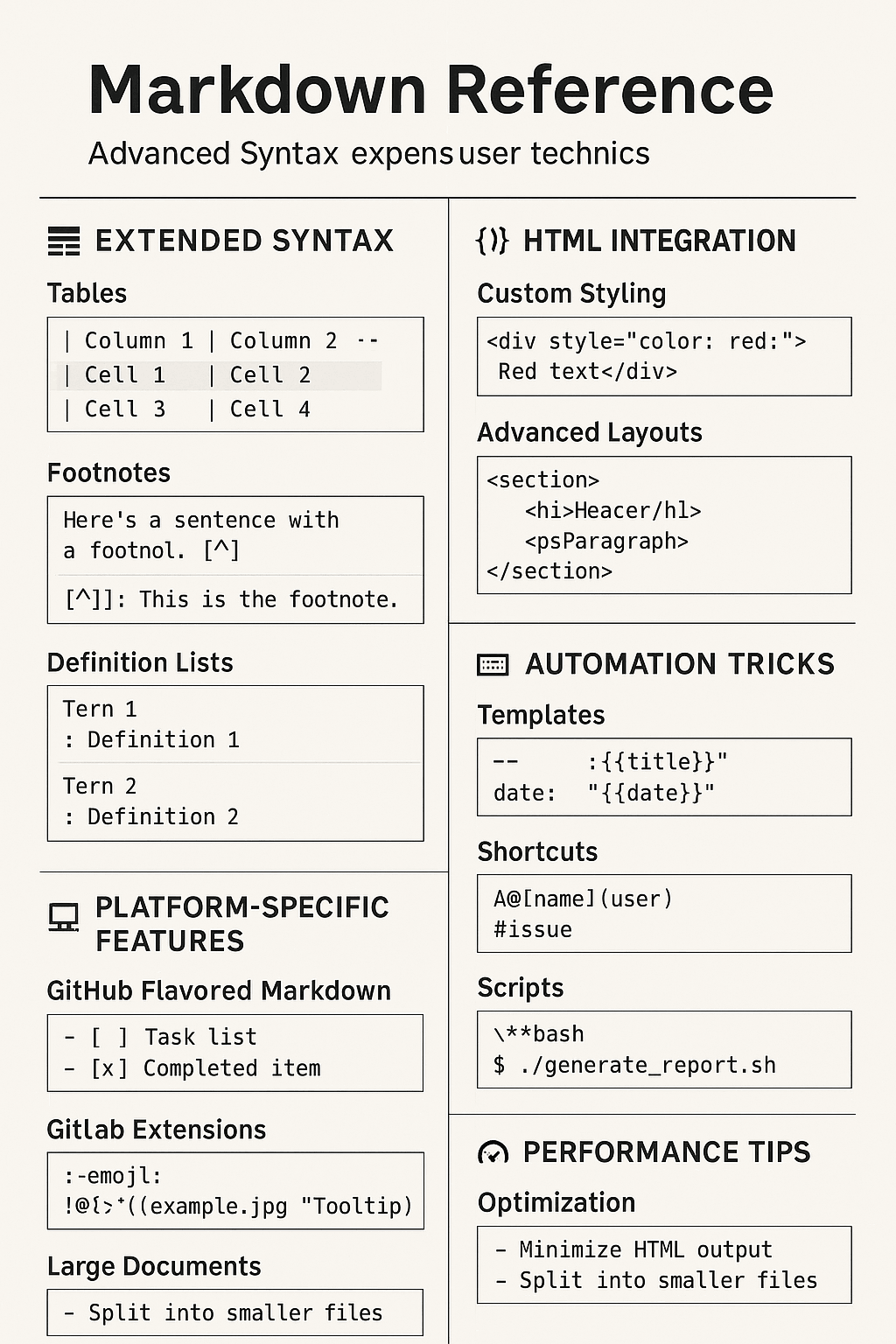
| Feature | Syntax Example | Notes |
|---|---|---|
| Table Cell Merging | <td colspan="2"> / <td rowspan="2"> |
Requires HTML |
| Code Block Line Numbers | ```javascript {.line-numbers} |
Depends on parser support |
| Footnotes | [^1] and [^1]: ... |
Extended syntax |
| Definition Lists | Term\n: Definition |
Extended syntax |
| Task Lists | - [x] Task |
Extended syntax |
| Collapsible Content | <details><summary>...</summary>...</details> |
Requires HTML |
| Math Formulas | $E=mc^2$ / $$...$$ |
Requires LaTeX support |
| Mermaid Charts | ```mermaid\ngraph TD; A-->B;\n``` |
Requires Mermaid support |
| Bidirectional Links | [[Note Name]] |
Obsidian specific |
| Template Variables | {{date}} |
Obsidian specific |
| Document Conversion | pandoc input.md -o output.pdf |
Requires Pandoc installation |
Disclaimer: Some advanced techniques in this article depend on specific Markdown parsers or platforms. Please confirm that your environment supports the relevant features before use. For features requiring HTML and JavaScript, please be aware of potential security risks.
References
[1] Markdown Guide. (2024). Extended Syntax. https://www.markdownguide.org/extended-syntax/
[2] GitHub. (2024). GitHub Flavored Markdown Spec. https://github.github.com/gfm/
[3] Mozilla. (2024). HTML: HyperText Markup Language. https://developer.mozilla.org/en-US/docs/Web/HTML
[4] GitLab. (2024). GitLab Flavored Markdown (GLFM). https://docs.gitlab.com/ee/user/markdown.html
[5] LaTeX Project. (2024). LaTeX - A document preparation system. https://www.latex-project.org/